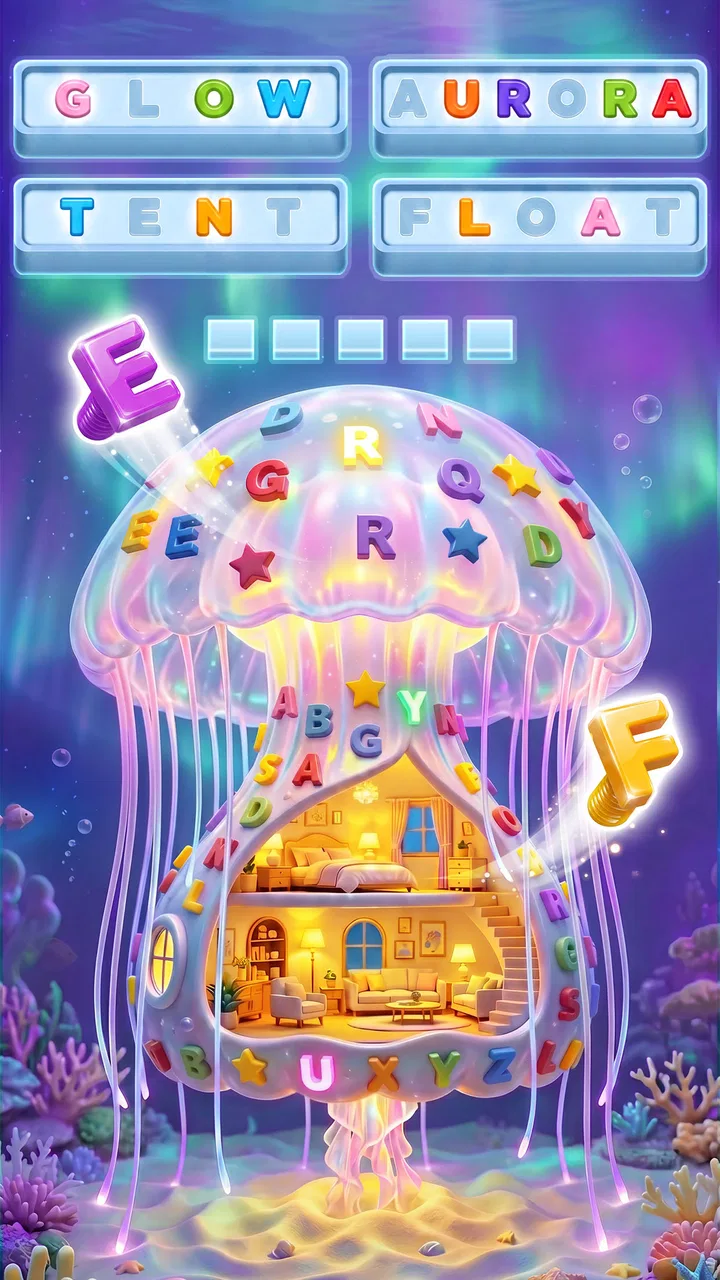
Word Screw: 3D Screw Puzzle
- 4.8
- Rating
- 1.00M
- Installs
- Free
- Price

 Analysis by App-foxy
Word Screw: 3D Word Puzzle takes a familiar word-search idea and gives it a tactile twist: instead of simply scanning a flat grid, I unscrew letters from a three-dimensional arrangement and use them to uncover words. That central action is what makes this puzzle game stand apart from ordinary word searches. It feels more like handling a small mechanical object than filling in a worksheet, while still rewarding vocabulary, observation, and patience.
I found the concept easy to understand but surprisingly effective for short play sessions. The game is free to start, aimed at Everyone, and developed by Astrasen Global. Its store page shows a 4.9 average from around 7.7 thousand ratings, with more than 500 thousand installs. Those figures suggest that the unusual word-and-screw combination has found an audience, but the important question is whether the physical presentation adds meaningful puzzle depth or is only decoration. In my experience, it does both, although not equally in every situation.
Why the screw-based word search matters
The key capability is the way letters are presented as parts of a three-dimensional puzzle. In a conventional word-search game, the main challenge is visual: I scan rows, columns, and diagonals until a familiar sequence appears. Here, I first have to understand which letters can be unscrewed and how the visible arrangement affects my next choice. That extra step changes the rhythm from quick recognition to a mixture of planning and word spotting.
You May Also Like

 Blood Strike: 2.5 Anniversary
Blood Strike’s Loadouts Turn Every Drop Into a Tactical Gamble
A close look at Blood Strike’s custom loadouts: how fast access to signature weapons reshapes its battle royale rhythm, rewards preparation, and narrows the gap between fights.

 Pandora - Music & Podcasts
Pandora’s Music Is Easy to Start, but Harder to Recover
Pandora’s strength is its low-effort path from a seed to a station. Its weak spot is how much confidence it asks you to place in connection, setup, and quiet recovery.

 8 Ball Pool
 Is Built on Rivalries, Rematches, and Routine
A close look at the rivalries, rematches, shared routines, and unanswered safety questions that turn a quick pool match into a persistent mobile community.

 Samsung Music
’s Quiet Strength Is Playing What You Already Own
Its reach comes less from spectacle than from dependable access to a personal library. That simplicity is both the app’s strongest retention engine and its ceiling.

 AccuWeather: Weather Radar
AccuWeather Review: A Quick, Clear Forecast for Everyday Decisions
For everyday plans, the best forecast is the one you can understand quickly. AccuWeather makes rain timing, radar, and local conditions easy to act on, with a few trade-offs.

 Hill Climb Racing
Why Hill Climb Racing Still Turns Crashes Into One More Run
A tiny car, a bumpy hill and one more upgrade: Hill Climb Racing keeps resurfacing because its simple chaos makes every near-miss feel personal.
More From Our News Desk



This matters because the game makes me look at a word puzzle spatially. I am not only asking, “Can I see a word?” I am also asking, “Which letter should I remove first, and what will become easier to read afterward?” Even when the vocabulary itself is straightforward, the order of actions can make a level feel more involved than a standard grid.
The strongest part of the idea is its physical feedback. Removing a letter feels like making progress in an object rather than merely selecting a tile on a screen. That small distinction gives the game a more hands-on personality. I would not call it a complex mechanical simulator, but the screw theme is connected to the central interaction instead of being pasted onto an unrelated word game.
At the same time, this design creates a limitation. Players who enjoy fast word recognition may find the extra manipulation slower than a traditional word search. If I already know the answer, I may still need to work through the arrangement before the board opens up. That can be satisfying when I want a deliberate puzzle, but mildly frustrating when I am looking for a rapid vocabulary challenge.
What I actually do during a level
In practice, I begin by studying the visible letters and looking for possible word patterns. I do not immediately remove the first letter that catches my eye. A better approach is to identify letters that appear to block several promising paths, then consider whether taking one away will expose a more useful combination. This is the first non-obvious lesson I took from the game: the best move is often the one that improves visibility, not the one that completes the shortest word.
That decision-making gives the game a gentle layer of resource management, even though the basic goal remains word finding. Every action changes what I can see. When I rush, I sometimes choose a plausible letter and leave myself with a less readable arrangement. When I pause for a moment and compare several possible removals, the board becomes easier to solve.
The three-dimensional layout also affects how comfortable the game feels on a phone. I prefer playing with the device held steadily and using short taps rather than trying to operate quickly with one thumb while walking. The visual arrangement asks for attention, particularly when several letters are close together. This is not a major obstacle, but it is a practical reason to treat the game as a focused break rather than something to play while multitasking.
I also learned to separate two kinds of difficulty. Sometimes I understand the word but cannot reach the relevant letter immediately. In other moments, the available letters make me reconsider my vocabulary. Those situations feel different, and recognizing which one I am facing helps me avoid wasting time. If the word is clear, I look for the unlocking sequence. If the arrangement is clear but the word is not, I stop manipulating and search for familiar endings, prefixes, or letter groups.
A useful way to approach unfamiliar boards
My most reliable workflow is to inspect the whole structure before making a move, note two or three possible word fragments, and then choose the removal that reveals the most information. I avoid committing to a single answer too early. This is especially useful when a visible sequence could belong to several words, because the first attractive guess is not always the most efficient route through the puzzle.
Another helpful habit is to use the outer or most exposed letters as a starting point. They are easier to evaluate and usually require less visual effort than letters buried in the arrangement. Once the obvious pieces are cleared, I can reassess the center with less clutter. The game rewards this gradual cleanup more than frantic tapping.
There is also a trade-off between solving carefully and maintaining momentum. If I analyze every possible letter, a simple board can become unnecessarily slow. I use a quick first scan, then reserve deeper planning for positions where two or more routes look equally plausible. That balance keeps the tactile feature enjoyable instead of turning each level into a long calculation.
For anyone wondering whether the game requires advanced vocabulary, I would not approach it as a specialist word challenge. The main test is the combination of recognizing words and manipulating the board. A broad everyday vocabulary helps, but spatial patience can matter just as much. Someone who is not confident with word games may still enjoy it if they like visual puzzles and are willing to experiment.
The best everyday scenario for playing
The game fits particularly well into a quiet waiting period. I can imagine opening it during a short commute, while waiting for an appointment, or after finishing a task when I want something more engaging than scrolling. A single puzzle gives my attention a clear target, and the screw-and-word interaction makes the break feel more active than a basic matching game.
My favorite use is a short evening session when I want to exercise my attention without committing to a long story, competitive match, or complicated strategy system. I can focus on one board, pause when I need to think, and return to the same style of problem without remembering a plot or a large set of controls. That makes it approachable when my energy is low but I still want to do something mentally stimulating.
It can also work for people who enjoy tactile interfaces. The appeal is not only the words; it is the repeated feeling of clearing a physical-looking object. Players who normally find flat word searches dull may appreciate that extra sense of movement. Conversely, someone who wants a pure vocabulary workout might prefer a conventional word-search or crossword app, where the interface stays out of the way and the language task is more direct.
I would be cautious about recommending it as a distraction for very young children simply because it is rated Everyone. The age label makes it broadly suitable, but the best experience still depends on reading ability, patience, and comfort with small visual targets. An adult playing alongside a child could turn the letter removal into a shared observation exercise, while a child who dislikes word puzzles may not be won over by the three-dimensional presentation alone.
Where it differs from ordinary alternatives
Compared with a standard word-search game, this one gives me more control over the route to an answer. In a flat grid, the challenge is usually finding a hidden sequence among many letters. Here, the board itself becomes part of the clue. That makes each decision feel more consequential, but it also means the game is less immediately readable.
Compared with crossword-style games, the emphasis is different. Crosswords usually ask me to retrieve a word from a clue, while this game makes me discover words through letters and spatial arrangement. I do not need to interpret a definition in the same way; I need to notice patterns and decide how to expose them. Players who enjoy clues and word meanings may find a crossword more satisfying, while players who like visual manipulation may prefer this format.
It also differs from purely mechanical screw puzzles. Those games often focus on freeing objects through sequencing and physical constraints. Word Screw adds language recognition to that process, so solving depends on both seeing the structure and understanding what the letters might form. If I want a logic puzzle with no vocabulary component, another screw puzzle would probably be a better match. If I want a word game that feels more hands-on, this is the more distinctive choice.
The friction I noticed while playing
The main weakness is that the novelty can sometimes slow down the underlying word task. A good puzzle should make the extra layer feel meaningful, and here it generally does, but not every moment feels equally deep. There are times when I am performing a sequence that seems obvious rather than solving a genuinely difficult word arrangement. Those stretches are harmless in a casual game, though they may disappoint players who expect constant challenge.
The visual format can also demand more concentration than a flat board. I would not choose it when I want to play with minimal attention, because the arrangement benefits from being viewed carefully. Small-screen play may feel less comfortable for users who prefer large letters or who have difficulty distinguishing nearby elements. The game’s concept depends on seeing the board clearly, so display comfort directly affects enjoyment.
Free access makes it easy to try, but optional purchases range from $1.99 to $99.99 per item. That broad range is worth keeping in mind before spending. I recommend treating the free starting point as a chance to decide whether the core interaction suits you, rather than assuming every purchase is necessary for a good experience. Anyone sensitive to in-app spending should review each purchase prompt carefully and keep the game within a personal budget.
The current version is 1.181 and it runs on Android 6.0 or later. That makes it accessible to many older Android devices, although compatibility alone does not guarantee that every screen will feel equally comfortable. On a smaller or slower phone, I would pay attention to how easily I can distinguish the letter arrangement and whether the tactile presentation remains pleasant during longer sessions.
Who gets the most from this particular design
I think the strongest audience is made up of players who enjoy word puzzles but want a more physical interface than a grid. The game rewards people who like stopping to inspect a board, testing a sequence, and watching a cluttered arrangement become clearer. It is also a good fit for casual players who prefer self-paced challenges over timers, rankings, or head-to-head pressure.
It may be especially appealing if you move between different kinds of puzzles. Someone who alternates between word searches and logic games will probably understand the attraction quickly: the vocabulary gives the board meaning, while the screw mechanic gives the vocabulary a route. That combination creates enough variety to make a familiar word search feel less routine.
I would recommend skipping it if your priority is speed, pure clue solving, or a completely distraction-free reading exercise. A crossword app is better for definition-based play. A classic word search is better for immediate scanning. A dedicated mechanical puzzle is better if letters are not important to you. This game earns its place only when the combination of both elements sounds appealing.
For players who do choose it, my advice is to resist tapping randomly. Scan first, look for the removal that exposes several possibilities, and reassess after each meaningful change. That approach reduces wasted moves and makes the three-dimensional design feel like a genuine puzzle tool rather than a visual gimmick. It also helps beginners understand why a board that looks simple can still require planning.
My final recommendation
After spending time with it, I see Word Screw: 3D Word Puzzle as a focused hybrid rather than a replacement for every other word game. Its defining strength is the way it turns word discovery into a physical-looking sequence of removals. When that interaction matches my mood, it gives a satisfying sense of progress that a flat grid does not always provide.
The experience is not perfect. The extra manipulation can feel slower than necessary, the three-dimensional layout asks for attention, and the available in-app purchase range means I would keep an eye on spending. Still, those limitations are easier to accept because the central idea is clear and consistently tied to play.
My recommendation is simple: try it if you want a free puzzle game that combines everyday vocabulary with careful spatial decisions. Give it a few boards before judging it, because the appeal becomes clearer once you stop treating it like a normal word search. If you enjoy uncovering answers one deliberate letter at a time, this is a distinctive and worthwhile casual game; if you want instant word spotting, choose a simpler alternative instead.
FAQs for Word Screw: 3D Screw Puzzle
01What is Word Screw: 3D Word Puzzle?
Word Screw: 3D Word Puzzle is an innovative word game that challenges players to find and connect words in a three-dimensional space. Unlike traditional word puzzles, this game adds a spatial twist, requiring players to rotate and explore a 3D cube to uncover hidden words. It's available for both Android and iOS.
02How do you play Word Screw: 3D Word Puzzle?
To play Word Screw: 3D Word Puzzle, you need to swipe across letters on a 3D cube to form words. The cube can be rotated in any direction, allowing for a dynamic search for words. As you progress, the puzzles become more complex, requiring strategic thinking and spatial awareness.
03Is Word Screw: 3D Word Puzzle suitable for all ages?
Yes, Word Screw: 3D Word Puzzle is designed to be family-friendly and suitable for all ages. The game offers different difficulty levels, making it accessible to both younger players and adults looking for a challenging brain exercise. It's a great way to improve vocabulary and spatial skills.
04Does Word Screw: 3D Word Puzzle require an internet connection?
Word Screw: 3D Word Puzzle can be played offline, making it perfect for those moments when you're on the go without internet access. However, some features, such as leaderboards and special events, may require an internet connection to function properly.
05Are there any in-app purchases in Word Screw: 3D Word Puzzle?
Yes, Word Screw: 3D Word Puzzle offers in-app purchases. These can include hints, additional levels, or cosmetic upgrades to enhance your gaming experience. While the game is free to download, these optional purchases can provide extra content and features for dedicated players.
Pros
- Engaging 3D visuals enhance word puzzle experience.
- Expansive vocabulary challenges keep it fresh.
- User-friendly interface for easy navigation.
- Adaptive difficulty levels suit all skill ranges.
- Offline mode available for uninterrupted play.
Cons
- Advertisements can be frequent and disruptive.
- Limited free hints might frustrate beginners.
- Some in-app purchases are pricey.
- Occasional lag on older devices noted.
- No multiplayer mode for competitive play.

Word Screw: 3D Screw Puzzle
Gallery